
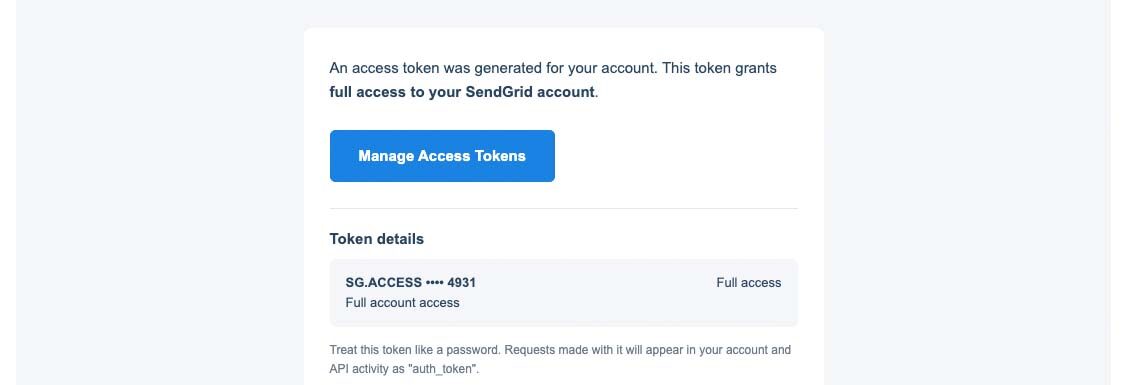
This week I received a barrage of phishing emails from “SendGrid.” The subject lines were along the lines of:
- An access token was generated for your account
- Your API requests aren’t processing
- Sign-in from new device
- Support The Republicans
- Dormant Account Notification
- API Authentication Insufficient
The common thread is that they all create a sense of urgency trying to get you to log into SendGrid – and become another victim of a hijacked SendGrid account.
It was not a forgery so it passed spam checks
Most of us know that phishing means a faked sender address but this was different. Because the emails were sent using domains that use SendGrid from SendGrid’s servers, they had proper SPF, DKIM, and DMARC, the three checks that mail providers use to confirm a sender is who they say they are.
The messages came through to my Gmail because they were real. It was sent through that company’s own SendGrid account, signed with their own key. Someone had gotten into the account and was using it to phish other SendGrid users, me included.
How that happens
When a business sets up an email service like SendGrid, it adds a few DNS records. Those records tell the world: “This service may send email as us.”
That trust belongs to the account, not to a person. Whoever holds the password or an API key can send email that is, technically, genuinely from you. Your customers’ spam filters will wave it through.
The company did nothing unusual. One leaked credential was enough.
What gave it away
First of all, this is not the first time bad guys have done this, so I’ve developed an eye for it. But here are the things to look for:
- Look at the sending email address. 100% of the time it’s NOT Sendgrid.
- Look at the email footer, in many cases it has the sending company’s name.
- The emails look incomplete with unpopulated template placeholders or merge tags such as {{account_email}}
Small things. Easy to miss on a busy morning.
What I would check today
If your website or business uses an SMTP service like SendGrid:
- Turn on two-factor authentication for the account.
- Delete API keys you no longer use, and give the rest only the permissions they need.
- Look at the activity feed now and then. You should recognize what is being sent.
- Know where your keys live. On many websites, they sit in a plugin setting or a config file that nobody has looked at in years.
Most importantly: When a security alert arrives by email, do not click. Go to the service directly and look there.
One more thing
One of the “senders” was a financial services company, so I picked up the phone to let them know. What we don’t want is bad guys changing tactics to try to get credentials to their client’s actual accounts.
So if you ever spot something like this, do the same. They are probably the last to find out, and a two-minute call can save them a very bad week.